
Student iCON
Student iCON provides students with access to educational Google tools via the MIMS Portal. This page offers portal login guidelines, available applications by level, password recovery steps, and technical support.
Students are provided with a student iCON (Google) account in his/her course of education in school until the end of secondary/ JC.
Students can use their web browser in their internet-enabled devices to access student iCON. Students can login via MIMS Portal http://mims.moe.gov.sg/ (opens in new tab) with their MIMS username and password.
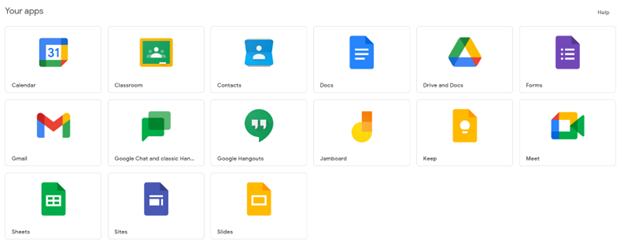
Apps available for Primary 1 to 3:
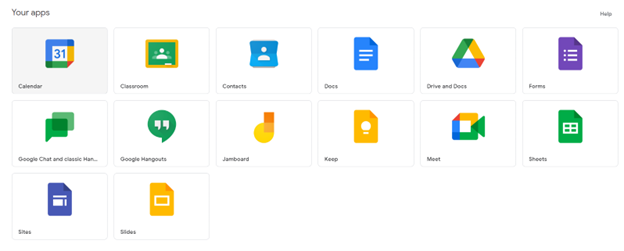
Apps available for Primary 4 to 6:
If your child/ward encounters issues accessing student iCON/MIMS, please follow the steps shown in the student iCON/MIMS recovery poster below.
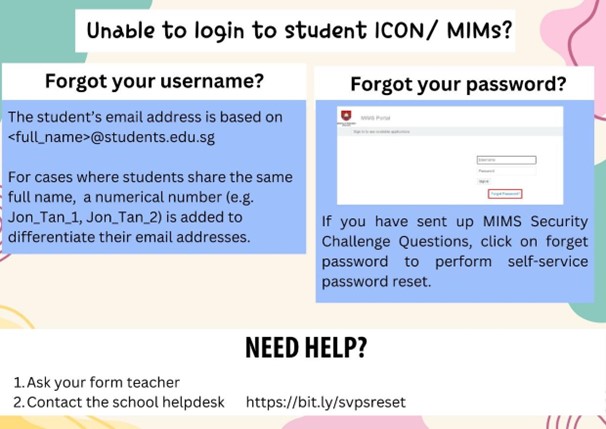
Useful information
Quick Links/Guides
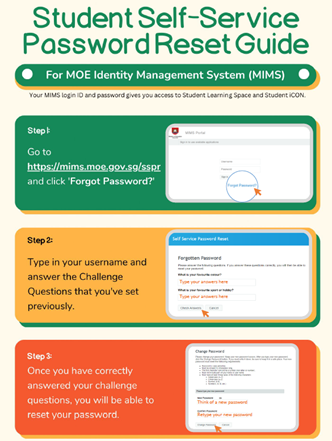
How to reset MIMS password
Who? Only if challenge questions have been set up previously.
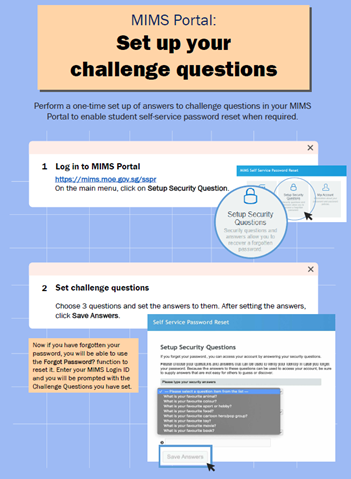
Setting up answers to challenge questions
Why? Your child/ward will be able to perform a password self-reset.
Support
For school technical support for SLS and student iCON/MIMs accounts, complete form (opens in new tab)