
Student Learning Space
The Student Learning Space enables self-paced learning using curriculum-aligned online resources. This page details login procedures, password recovery methods, and technical support assistance.
The SLS is an online platform with tools and curriculum-aligned resources for all students to learn at their own pace and collaboratively, and can be accessed here: https://learning.moe.edu.sg/
With SLS, students can take greater ownership of their learning and pick up skills and habits that prepare them for lifelong learning. Teachers will also use the SLS to complement classroom teaching and learning.
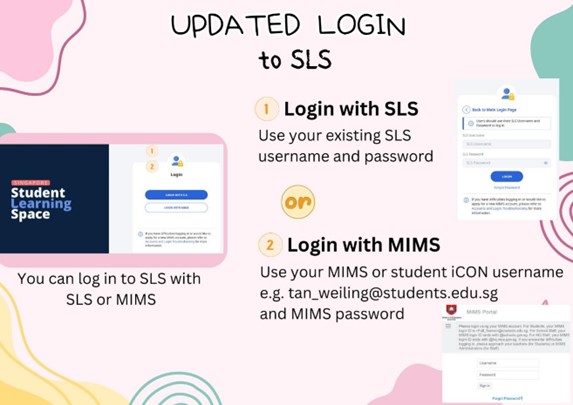
Your child/ward will be able to login to SLS using the following:
- SLS username and password
- MIMS username and password
Note: For students, the MIMS username is the same as the student’s iCON email address, ending with @students.edu.sg.
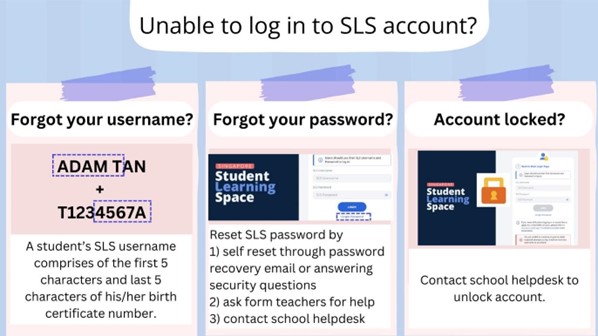
SLS and Student iCON are key platforms used by the school to support students in their learning. If your child/ward encounters issues accessing SLS, please follow the steps shown in the SLS recovery poster below.
SLS student account setup guides and useful links
Useful Information | Quick Links/Guides |
Navigating the New SLS Homepage | The image in this table cell has been replaced. It was originally referencing "/images/SLS3.png" |
Navigating Within an SLS Assignment | The image in this table cell has been replaced. It was originally referencing "/images/SLS4.png" |
Setting up A Password Recovery Email Why? Your child/ward will be able to perform a password self-reset. | |
Setting Up/Updating Answers to Security Questions Why? Your child/ward will be able to perform a password self-reset. | |
Recommended Operating Systems and Browsers SLS is accessible through internet browsers on Windows PC, Mac, tablets and mobile devices. |
Support
For school technical support for SLS and student iCON/MIMs accounts, complete form (opens in new tab)